

Recordings
An agent can record a desktop box, or the phone or tablet of a device box, while it works and show you the clip in the thread, rather than describe what it did. When it tests something, it captions each step and its result, so you can see what it checked and whether it passed.
What a clip shows
A clip shows the box’s whole screen, up to 1280 pixels wide and 30 frames a second. The screen sits on a plain background, dark or light to match it, with slightly rounded corners.
The pointer, clicks and keys
BB Box draws its own pointer over the clip, larger than the screen’s. The arrow is the usual shape. A link or a button shows a pointing hand, a text field an I-beam, and a drag an open hand for the whole drag. A drag that starts on a window’s edge or corner shows a resize cursor instead. The I-beam stays from the click in the field until the pointer glides on to the next place, and it stays through the Typing pill. The pointer is black with a white outline and a soft shadow over light parts of the screen, and white with a black outline over dark ones. A pointing hand or an open hand is white with a dark outline over light and mid-grey parts, as a desktop’s own hand is, and black with a white outline over dark ones. The shadow follows the shape. There is no box behind the pointer. It changes only when what is under it stays lighter or darker for half a second, and a hand or a resize cursor holds for at least a third of a second. It glides to each place the agent clicks, arriving as the click lands, rests on the button for a moment after the click before it moves on, and follows your pointer smoothly when you have control.
- Each click shows a ring where it lands, drawn in the pointer’s fill: blue for a right click, and two quick rings for a double click. The ring grows and fades within 0.4 seconds. It is a band, and it does not stay as a disc under the pointer. A click that closes its window, such as Cancel in a dialog, rings while the window is still there: the pointer arrives up to half a second sooner, and the ring ends when the window goes.
- While the pointer moves with the button held, a soft disc stays under it, so a drag shows as one movement. A button held still is a click, and the disc does not stay.
- Each shortcut or special key shows in a small pill, such as “Ctrl+S”, “⌘K”, “Enter” or “Tab”, for about a second. A key pressed again counts up, such as “↓ ×3”.
- A key that types a character is never shown as a shortcut, even with AltGr, Option on a Mac, or Ctrl and Alt together on Windows, where they are AltGr. On Linux, Ctrl+Alt+T is a shortcut. A shortcut’s key is a letter, digit or ASCII symbol.
- Keys that build a character count as typing too: Ctrl+Shift+U and a code point on Linux, the Compose key, a dead key, or an input method.
- When the agent types into a field it named, one “Typing” pill shows, from when the text is in the field. One call is one pill, even when the typing is slow. A later secret call does not lengthen that pill or hide it. The pill never shows what was typed. When the whole line lands at once and a result follows within half a second, no pill shows: the result says it.
- Typing shows no pill at all into a password field, or when the text looks like a password, key or token.
- Your own typing, and the agent’s typing into a window or as single keys, show no pill either. BB Box cannot tell which field the keys go to, so it treats them as secret.
A pill sits below the region it would cover, or above it when below does not fit, so it does not hide the line that was typed. With nothing to avoid, it sits at the bottom, and moves to the top when the pointer is near the bottom of the screen.
On macOS and Windows, the computer-use driver draws its own pointer on the screen for each of the agent’s actions. While the agent records, BB Box hides it, so the clip has the same pointer as on Linux, and shows it again at the stop, or after 5 minutes if the recording is never stopped. A driver too old to hide it keeps it, and BB Box then draws your pointer only once you move it. On a Wayland desktop, BB Box does not sample the pointer yet, so it draws no pointer of its own there. The rings, pills and zooms are drawn everywhere.
Zooms
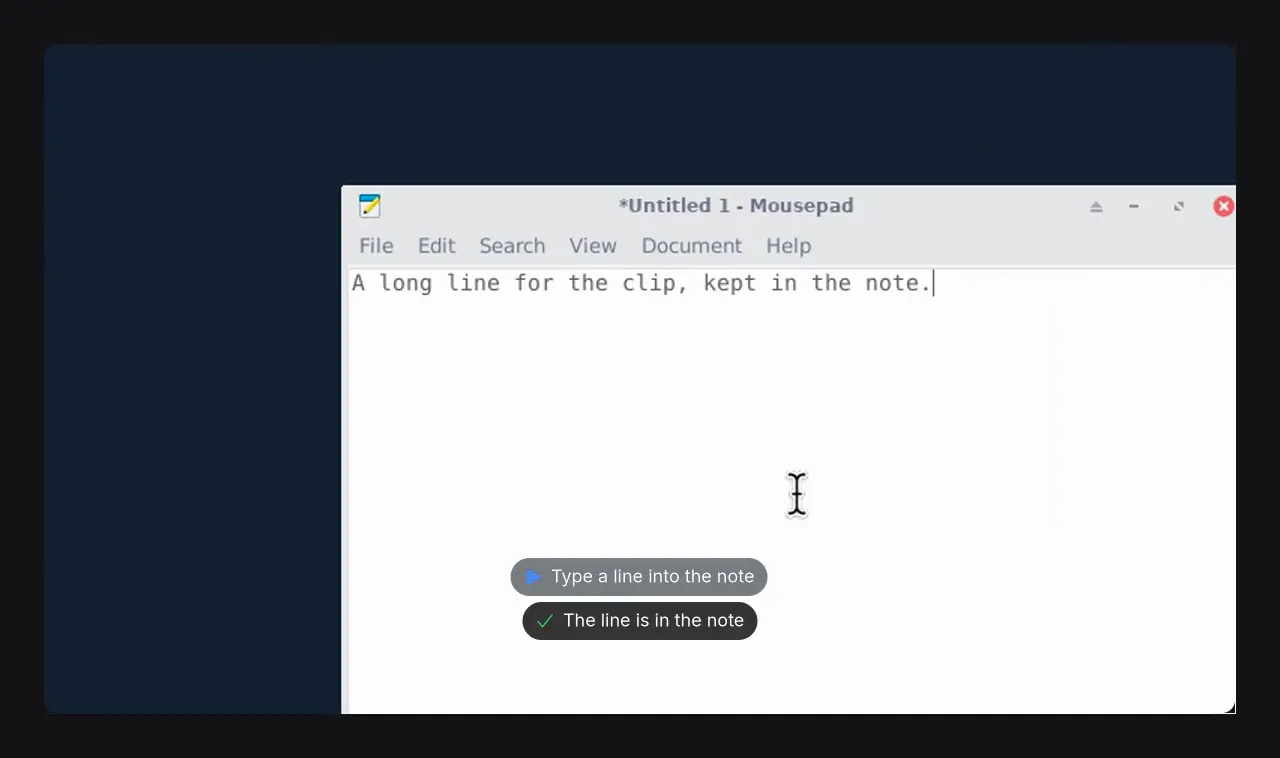
The clip zooms in gently, up to 2x, where the agent or you click, drag or scroll, and where the agent types into a field it named. It does not ease in on a window that has not painted. A window that changes size within a second of appearing is still opening. It holds the previous framing while that window is blank or still changing, then eases in on the first frame that has settled, and stays for 1.5 seconds once it is in. A zoom that could only land after its window has closed, or after something else has opened, is left out. When the agent clicks in a field and types into it within 2 seconds, the clip zooms on that field even when the window is a plain white page. A typing zoom frames the region the typing changed. When that region is the whole field and the field is too large to zoom, it frames a line at the caret instead, so the camera still eases in, and a long line stays inside the frame. It zooms out as far as it needs to, down to no zoom, so that region is never cut off. A call that never says it has finished is framed at the moment it started. A drag that starts in a named window frames that window where the drag ends. The clip holds still while you read, and zooms back out between bursts of work. When the next burst is in the same part of the screen and comes within 3 seconds, not counting cut idle time, the camera stays in and pans to it instead of easing out and back in.
When something opens elsewhere on the screen, such as a dialog, the clip zooms out as it opens, even if more clicks follow, and stays out for at least 1.5 seconds so the change is seen. A click that closes its own window zooms out too. The clicks after it get a zoom of their own. What an action changes in its own window, such as the text typed or a window being dragged, keeps the zoom.
It never zooms in on typing it treats as secret: a password field, your own typing, or typing whose field BB Box cannot tell.
The zooms follow what was actually done, not guesses: the agent’s clicks and keys, your input when you have control, and what changed on the screen.
Still stretches and captions
The clip starts on the first caption or action, and ends a second after the last result, action or change on the screen, fading out to the background. Idle stretches are cut to half a second, so a long session makes a short clip. A stretch is idle when nothing happens for more than a second: no caption, click, key or typing, the pointer still, and nothing on the screen changing but something as small as a blinking caret or a clock. Where BB Box does not draw the pointer, as on Wayland, it cuts only stretches where nothing on the screen moves. Where a cut skips 3 seconds or more, a small mark in a bottom corner shows the real time skipped, such as “14 s later”, for about a second. A clip the agent speeds up to 2x or 4x shows its speed in that corner the whole time. Every word is set in Inter. A glyph Inter does not have uses the box’s own font for that glyph only.
When an agent tests something, it captions each check:
- the step, at the top of the video, with a blue play mark, such as “It opens the notes file in TextEdit”
- the result, under the step, with a green tick if it passed or a red cross if it failed, such as “TextEdit shows notes.txt, empty”
A key pill starts with a keyboard mark, and a warning uses an amber one. The marks are the same height as the letters beside them.
The step caption and its result stay until the next step starts. Each caption and pill fades in and out over a fifth of a second, so one step crossfades into the next. A caption has faded in by the moment it was given. One moment has one caption: a warning and a result for the same moment show as one, and a cancel the step asked for is not shown as a failure. Each caption stays up long enough to read, even where idle stretches are cut or the clip plays faster. A step reads while it stays up, through its result. To give a result or a warning time to read, the clip holds it still for at most a second.
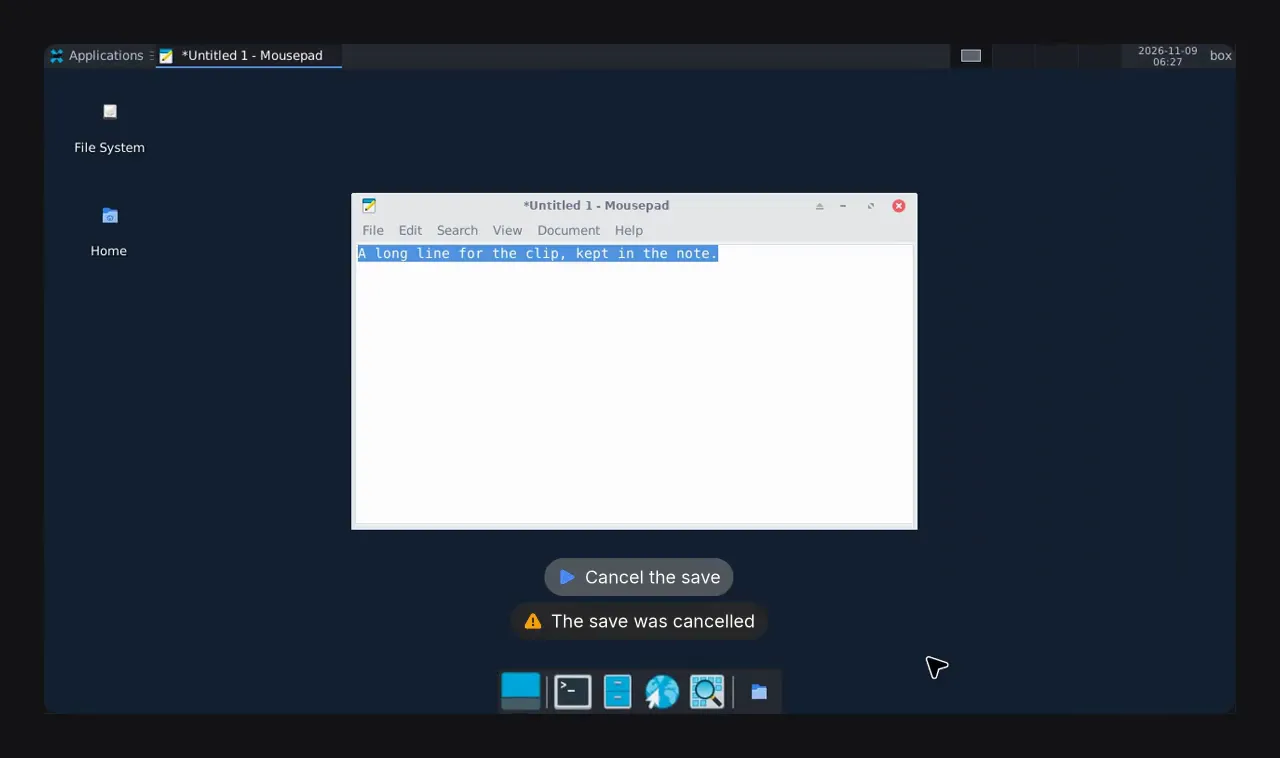
The agent can put the captions at the bottom of the video instead, above the Dock or taskbar, with the step above its result. It does this when what it tests is near the top of the screen, such as a menu bar or a window’s title. The marks then go to a top corner.
Each step’s captions also move to the other side by themselves when they would cover more of what changes during that step, such as a dialog’s name field at the top or the title bar of a window being dragged, than the other side would. Key pills and marks move with them.
The page under the clip lists the steps, each with its result and its real time in the recording. Select a step to play the clip from there.
Recording a device
On an iOS or Android box, a recording shows the device’s own screen, not the host’s desktop. It needs no viewer open in the panel. Device clips do not have the drawn pointer, key pills, zooms or background yet.
- The device is drawn in its frame, as the panel draws it, and turns in the clip when it turns. A foldable shows its fold.
- Each touch, by the agent or by you, shows as a circle where it landed.
- The captions sit in a band above the device, or below it, so they never cover the app.
- The clip is at most 1280 pixels wide and 1600 pixels tall. When the device turns during a recording, the clip is sized for both shapes, so the device keeps one size throughout.
- If the device restarts, or BB Box’s device server in the box restarts, the clip holds the last picture across the gap and says what happened there, such as “The device restarted here”. If the box stops, the recording ends there.
Asking an agent for a recording
Ask in your own words. For example:
- “Record your test run with each step.”
- “Record yourself setting up the app, at 2x.”
- “Record the menu bar check, with the captions at the bottom.”
- “Record it without cutting the pauses.”
- “Record it without zooming.”
- “Record the whole screen edge to edge, without the background.”
Agents record with the box_record tool. See agent tools.
Sharing a clip
A clip is an MP4 file in the thread’s storage folder. The captions and marks are part of the video, so they stay when you share the file. The list of steps is only on the page in the thread.
Limits
- A recording runs for at most 5 minutes. It then stops by itself, and the agent still gets the clip.
- Only a desktop box or a device box can be recorded: Linux, on X11 or Wayland, macOS, Windows, iOS or Android.
What it costs a box
While it records, a box uses about a tenth of a core on an X11 or Windows desktop, a quarter of a core on macOS, and two thirds of a core on Wayland. A device box copies the stream it already encodes for the panel, which added about 0.2% of a core on an iOS box. An ios box’s recording asks for its device’s video at two thirds of the device’s size at least, which still fills the clip, at most 1,600 pixels tall; a panel open on it at a larger size makes it larger. The work comes at the stop: framing a minute of an iPhone took 5 to 8 seconds there, and making the clip about 2 more.
A desktop also samples its pointer 30 times a second while it records, on X11, macOS and Windows: on X11 that used under a second of a core in a minute. The agent’s answer at the stop says how long each part of making the clip took. For an 11 second recording of a click, typing, three shortcuts and a drag, with its pointer, a ring, four key pills, zooms and the frame:
| Desktop | Stop and analyse | Draw the pills | Draw the rest and encode | Whole stop |
|---|---|---|---|---|
| Linux X11 in Docker, 4 cores, 1920 by 1080 | 0.7 s | 0.6 s | 2.4 s | 4.1 s, against 2.9 s before |
| macOS on Tart, 4 cores, 2048 by 1536, 16 s recorded | 1.3 s | 0.7 s | 3.1 s | 5.3 s |
| Windows on Proxmox, 4 cores, 1280 by 800, 29 s recorded | not timed | 0.1 s | 2.5 s | not timed |
A busy 67 second recording on an X11 desktop of 8 cores, six rounds of clicks, typing, shortcuts and drags, took 9.9 seconds to make in all.
Choosing the pointer’s colours reads the brightness of the screen once a second, in the pass that finds idle stretches. On a 15.5 second X11 recording of 8 cores that pass took 0.33 to 0.35 seconds with it and 0.31 to 0.35 seconds without, over 5 runs, and making the clip took the same time as before, 2.6 to 2.7 seconds.